Construction documents, controlled by AI.
Docverse is an AI-powered construction document control platform that organizes, tracks, and manages project documents in one secure workspace.
- Free sandbox workspace
- No credit card required
- Priced per workspace, not per user
- SKSara K.09:12
Rev 01 is up. Ahmed, can you look at the testing section when you get a sec?
Construction projects don't fail because teams lack documents. They fail because documents are uncontrolled.
Drag the handle to compare. Hover a problem on the left to see where it comes from.
One intelligent workspace for every project document.
From first draft to final archive, each document follows a single controlled lifecycle. No hand-offs to other tools, no guessing where it is.
Create
Start from a controlled template or let AI draft the document from a one-line brief. Numbering, project fields and branding fill themselves in.
- Auto-numbered MS-HVAC-015
- Project fields merged
- Company template applied
Upload any document. Understand it in seconds.
Docverse reads method statements, submittals, RFIs and drawings for you — pulling out the document number, revision, dates and requirements, and flagging what's missing before anyone signs.
- Reading file
- Extracting text
- Classifying
- Checking issues
Reading file…
Reading every page, table and title block.
PDF, Word, Excel and scanned drawings — text is extracted automatically.
Each answer points to the exact page and section, so nothing is taken on trust.
The AI suggests and flags. People review and approve — always.
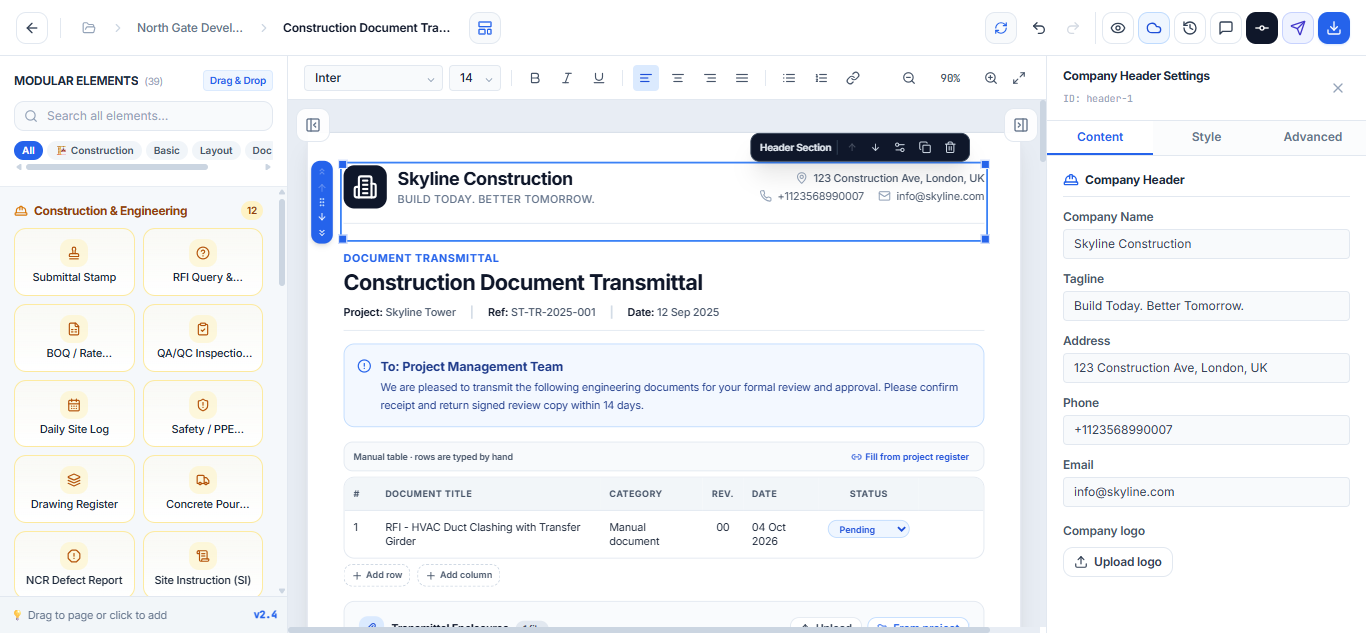
Build project documents from blocks, not blank pages.
Start from a construction template, drop in ready-made blocks like RFIs, submittal stamps and QA/QC forms, let AI tidy the wording — then export to PDF or Word with your company branding intact.
Move documents through approval without email chains.
Everyone knows whose turn it is, what is due, and why something was rejected. Approve or reject below to see the flow.
- SKAuthorAlex ZhangIn progress
- LTReviewerLina TanDue Tue 30 Sep
- ARProject ManagerDaniel LeeDue Wed 01 Oct
- CEClientClient EngineerDue Fri 03 Oct
- ApprovedIssuedComplete
Submitted for review with 6 attachments.
No activity yet. Every submission, approval and rejection is logged here with a timestamp.
Your whole project team, connected.
Project managers, document controllers, engineers, consultants, contractors and clients work on the same document — with the right permissions for each.
Serious documentation software,
held to a serious standard.
Construction drawings, commercial submittals, and rate schedules contain critical intellectual property. We build on rigorous infrastructure with complete tenant privacy.
Encrypted Storage & Transfer
All uploaded blueprints, submittals, calculations, and transmittals are encrypted at rest using AES-256 and transmitted exclusively over TLS 1.3.
Role-Based Access Control
Granular permission hierarchies ensure subcontractors, project engineers, QA/QC leads, and external consultants only view what their role authorizes.
Tamper-Evident Audit Trails
Every revision, approval stamp, and comment creates an unalterable log with cryptographic hash verification to ensure defensibility in claims.
Zero Model Training
Your proprietary specs, project calculations, and submittals are never used to train public or commercial AI models. Your project data remains strictly yours.
Fits the tools your project already uses.
Connect Microsoft 365 in one click, bring in the Word, Excel and PDF files you already have, and export to whatever the client asks for.
- SSharePointDocument libraries
- OOutlookEmail & transmittals
- TTeamsTeam notifications
One secure sign-in links SharePoint, Outlook and Teams. Only admins and document controllers can connect or disconnect it.
- SlSlack
- DsDocuSign
- AdAutodesk
- GdGoogle Drive
- DbDropbox
Questions, answered.
Everything teams usually ask before moving their project documents to Docverse.
Docverse is an AI document controller for construction teams. It brings your document register, templates, reviews, approvals and transmittals into one workspace, so you can create, review, approve and track every project document without spreadsheets or long email chains. It runs in your browser, with nothing to install.
Transmittals, RFIs, material submittals, method statements, risk assessments, inspection requests, technical queries, meeting minutes and project proposals — plus any custom document type you define with your own template.
Yes. Upload Word, Excel and PDF files. The AI analyzer reads them, pulls out the document number, revision, dates and requirements, and flags anything missing.
The analyzer checks for missing information, contradictions, required attachments and risk areas, and every finding points to the page and section it came from. It suggests — your reviewers still decide.
Yes. Invite project managers, engineers, consultants, contractors and clients with role-based permissions. Comments, mentions, tasks and notifications all live on the document.
Every document can follow a configurable route — author, reviewer, project manager, client — with due dates, approval notes, rejection reasons and digital signatures at each step.
Completely. Use the block editor to build templates with your branding, headers and footers, tables, signatures and construction blocks, then lock them so every document stays consistent.
No. Your specs, calculations and submittals are never used to train public or commercial AI models. Your project data remains strictly yours.
Yes — a free sandbox workspace to try everything out. Paid plans start at $39 a month per workspace, not per user, and begin with a free trial.
Build faster.
Approve smarter.
Control everything.
Bring every drawing, submittal and RFI into one controlled workspace — and never ask “which one is the latest?” again.
- Free sandbox workspace
- No credit card required
- Set up in minutes